
I volunteer as a community lead for a tech non-profit that helps people get their start in tech through free training programs and mentorship. The role has two halves: answering members’ questions in our Slack and running the non-profit’s social channels, where I share content that helps the wider community.
Our Slack runs across more channels than I can keep an eye on, but four of them carry most of the traffic. Between them, that’s roughly 80 questions a week. For a long time, the content side of my job meant I had to scroll through it all by hand, hunt for patterns, and build a calendar around whatever kept coming up.
On a good week, I got two or three posts out, and each one took three to five hours, including the research, writing, scheduling, and replying to comments afterward. All in, that was 15 to 20 hours a week on top of my day job, which is exactly how I ended up burned out.
I needed a better way to keep up. So I built a pipeline that listens to conversations across a community workspace, surfaces overlooked questions, and turns shared concerns into content that helps more people. It scans those four channels, drafts a reply to every real question for me to approve and send. Then it takes the ones worth answering in public, writes them up in my voice, and drops them into Buffer ready to schedule.
The posts have to be public because only a slice of our community lives in Slack. Plenty of members check social media every day but open the workspace once a week, and the people we exist to serve who haven’t found us yet are out there searching for answers that sit behind a login no search engine can reach. A question will still be answered in the channel first. But the same answer, published where people already scroll, keeps helping long after the thread goes quiet.
Here’s how I built it and how it transformed my workload and the community’s experience.
Why keeping up manually stopped working
The volume on its own was manageable. The harder part was that the questions I most needed to catch were the ones most likely to slip past me.
A few things were working against me at once:
- Questions got buried. Across the four channels, with people also chatting, brainstorming, and thinking out loud, the important questions sank under everything else moving faster.
- Time zones stacked up. I’m in Nigeria, while members are spread across Europe, America, and several time zones in between. I’d close my laptop at night and wake up to a stretch of conversations I’d slept through, with questions sitting unanswered the whole time.
- Deadline days turned into pile-ups. We run free training programs with hard application deadlines, and people tend to apply on the last day. The moment they hit a blocker, I’d get hundreds of messages at once. If I missed one reply, registration closed before that person ever heard back.
- The people who needed help most often never asked. They were new and didn’t want to look it, or they’d asked once, gotten buried, and given up. So when one of their questions did surface, raised by one person or a few, it usually spoke for a crowd that never said a word. Those were often the questions most worth answering in public.
Behind every one of those was someone who needed help and didn’t get it in time.
That’s what pushed me to build something, so the answer could already be there, in public, before the next person had to ask.
Every day, my workflow reads what the community asked, works out which of those questions are worth answering in public, and drafts the posts so they’re ready to go. I keep the one role only I can do: reviewing and approving what goes out.
The pipeline in five steps
The pipeline runs in five steps: read, filter, archive, cluster, and publish (in Buffer!). I built the workflow in Gumloop, a low-code canvas where I can chain AI steps, API calls, and a few custom nodes together in one place.
The first three steps turn raw Slack traffic into a clean, taggable archive. The last two decide what deserves a public answer and get it into Buffer.
- Read. Every message in those four channels runs through an AI Extract Data node in Gumloop. In a single pass, it decides whether the message is a question, drafts a response if it is, scores its own confidence in that draft as either “High” or “Needs Verification,” and tags it with a theme like onboarding, billing, technical, or feature request. I run this step on GPT-4.5 Mini, which handles that kind of multi-field extraction without burning through credits. The confidence score turned out to be a useful part: it lets me spend my attention where my judgment adds real value, instead of reviewing every row the same way.
- Filter. A separate custom node keeps only the rows flagged as questions and drops everything else. I made filtering its own step on purpose, rather than folding it into the AI prompt, for one reason: honesty. I want the AI to make one decision per pass and leave that decision visible in the data before anything goes live. If it ever starts misclassifying entries, the archive shows me, and the call stays on the record where I can audit it.
- Archive. Everything that survives the filter gets written into a Notion database I call the Community Ops Log. It has 10 fields, including who asked, which channel it came from, the theme, the draft response, a link back to the original message, and a status. Two views sit on top of it: a plain table for everything, and a Kanban review board grouped by status (needs review, verified, responded, and dismissed). That status field is what turns the archive from a passive log into something I can actually triage. At a glance, I can see how many drafts are waiting on me, how many I’ve already handled, and how many I’ve set aside.
- Cluster. Claude Opus, my preferred AI model to work with, groups the questions by the underlying problem, then decides which ones deserve a public answer. This is where the pipeline’s judgment lives, so I’ll walk through it properly in a moment.
- Publish. The questions that make the cut become content ideas and ready-to-post drafts, pushed straight into Buffer.
💡 A quick note on the screenshots that follow: the Slack workspace, channels, and member data you’ll see are a simulation I built for this article to keep my real community’s threads private. The pipeline is the same one I run live.
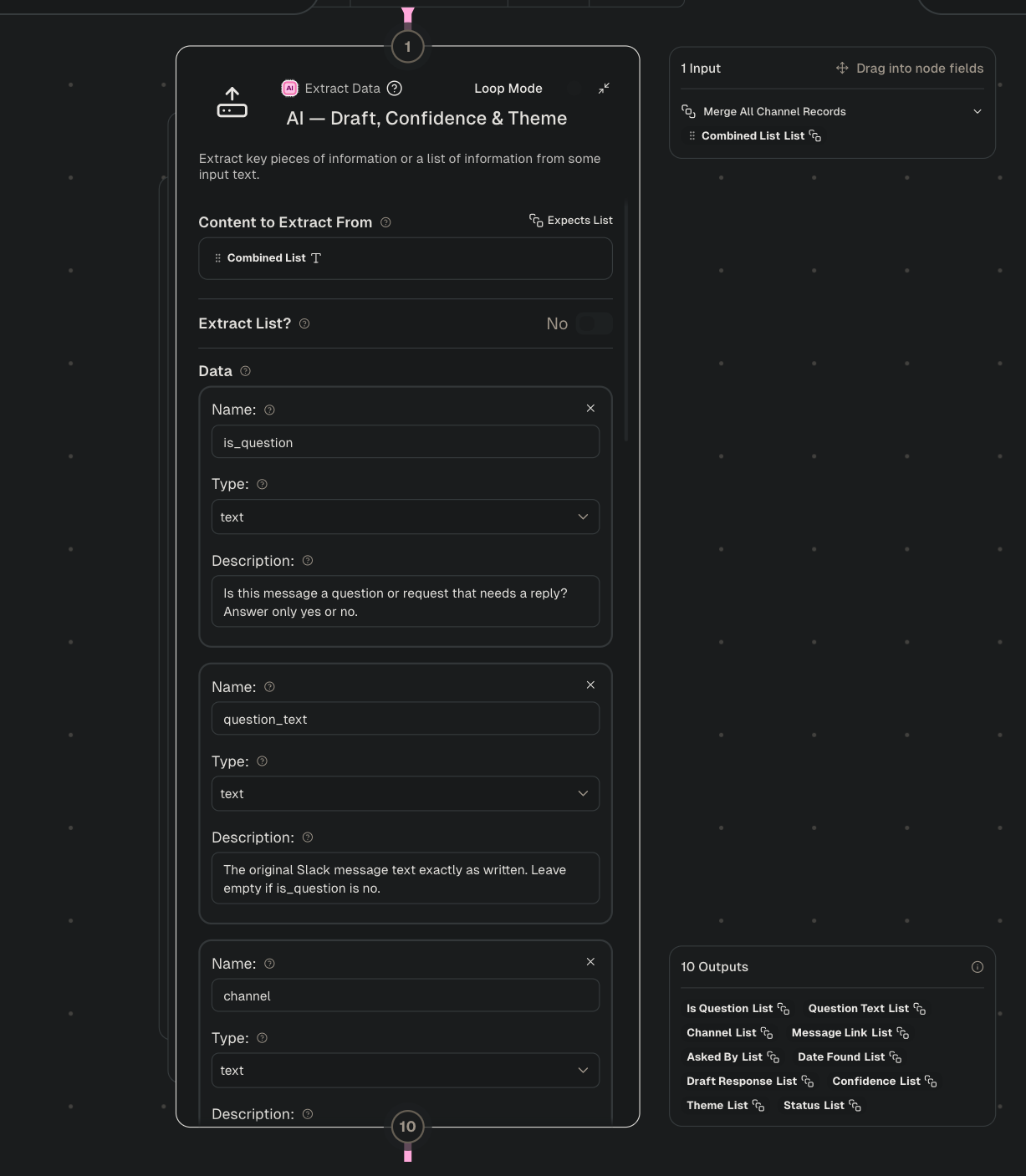
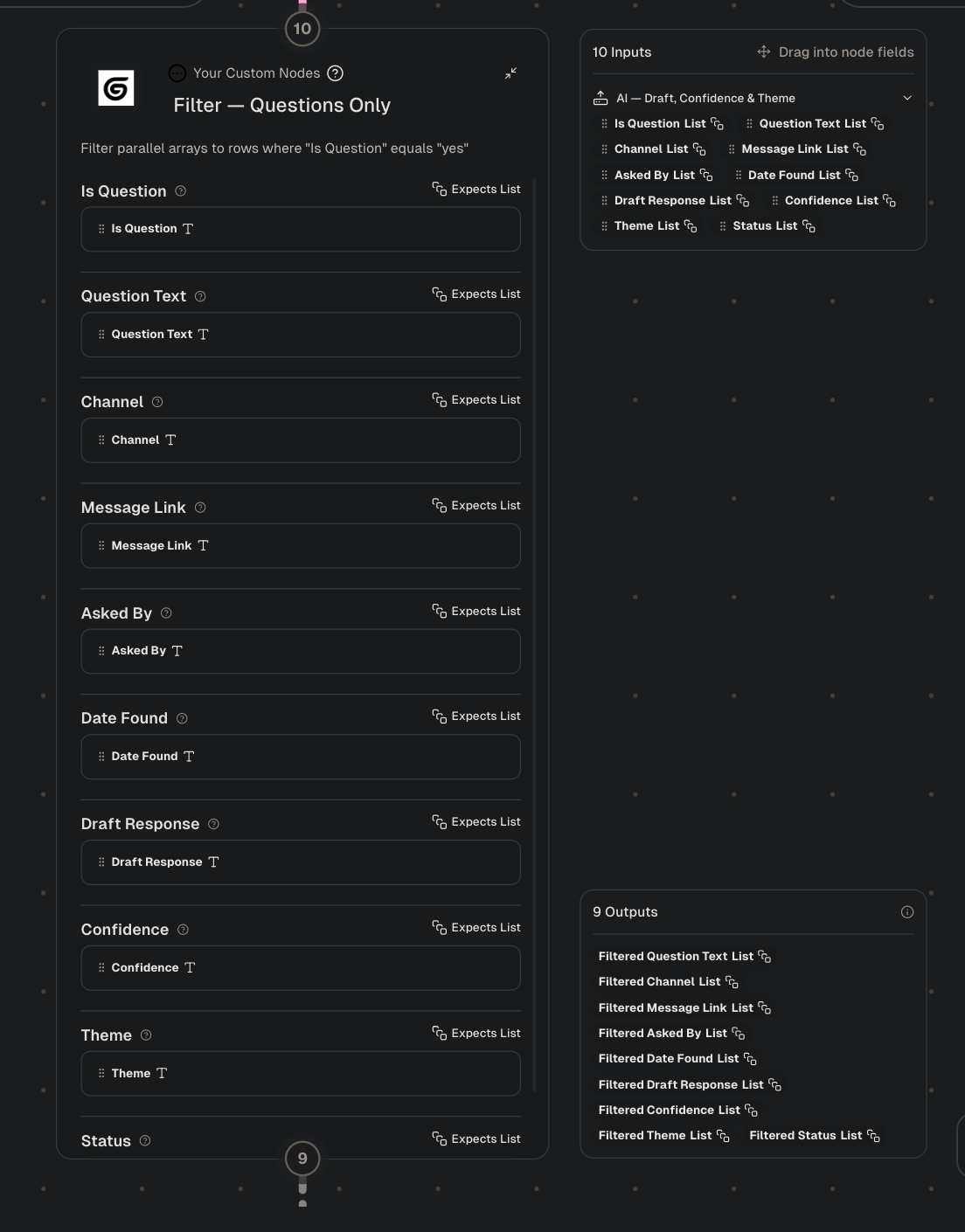
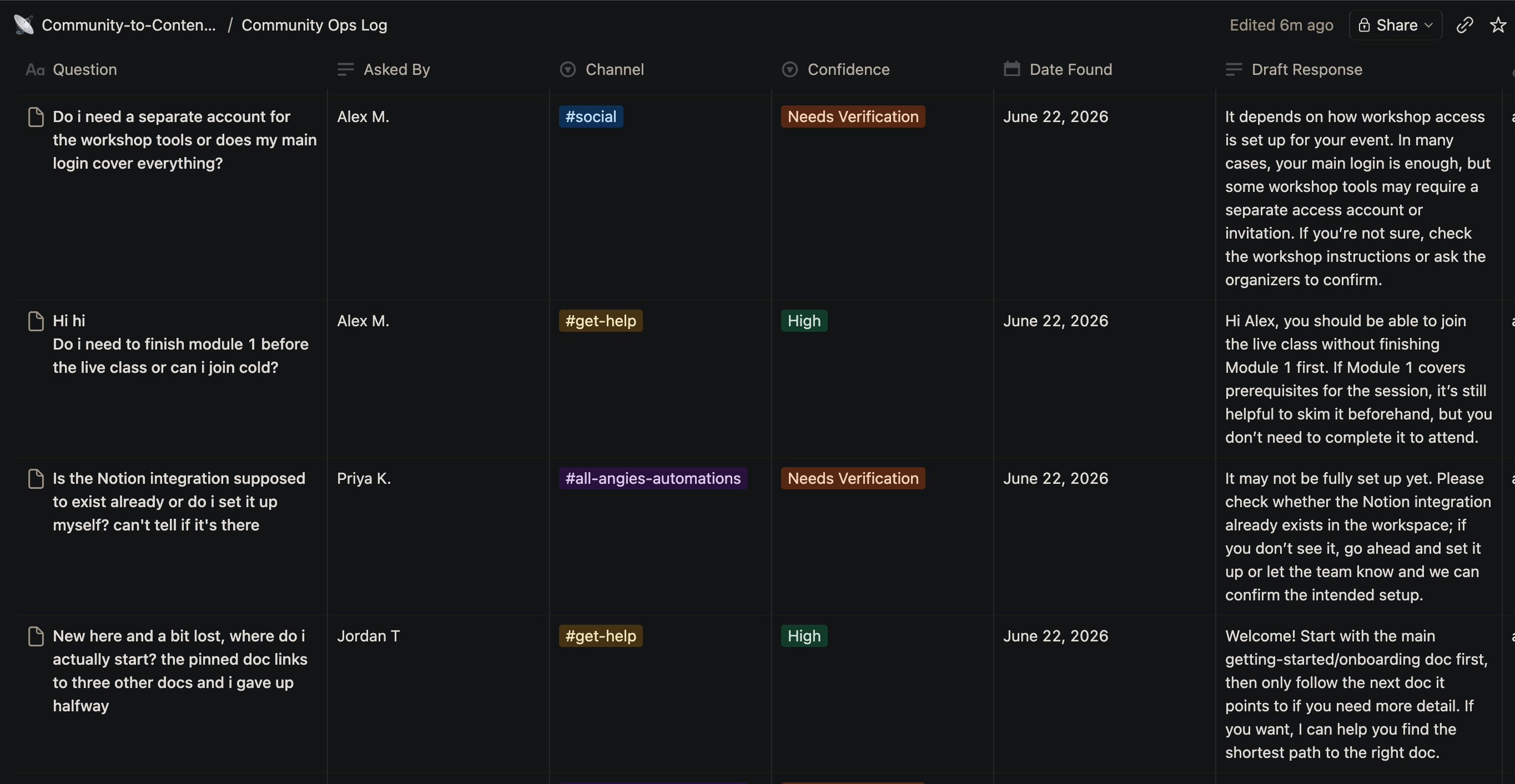
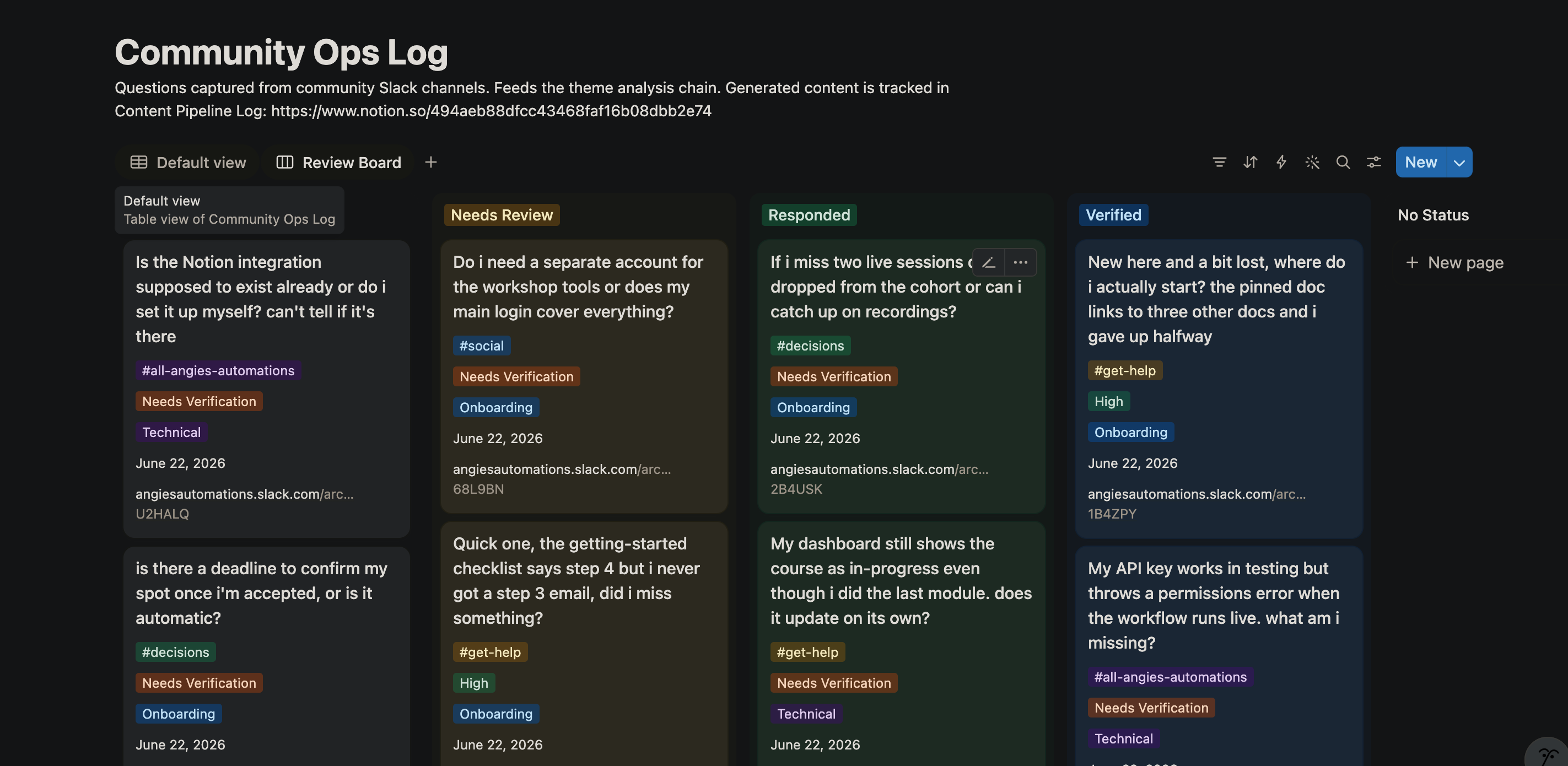
This step is probably the trickiest and the most important. Without it, every question becomes a post, and the queue fills with noise. So the pipeline defaults to not posting.
A Notion reader pulls everything in the Community Ops Log and hands it all to a Gumloop Ask AI node running Claude Opus. In a single pass, the prompt clusters the questions, grouping the ones that are asking about the same thing even when they’re worded differently. Then it scores each cluster to decide whether it deserves a public post, removes near-duplicates, and for the themes that make the cut, writes a content idea and drafts the posts.
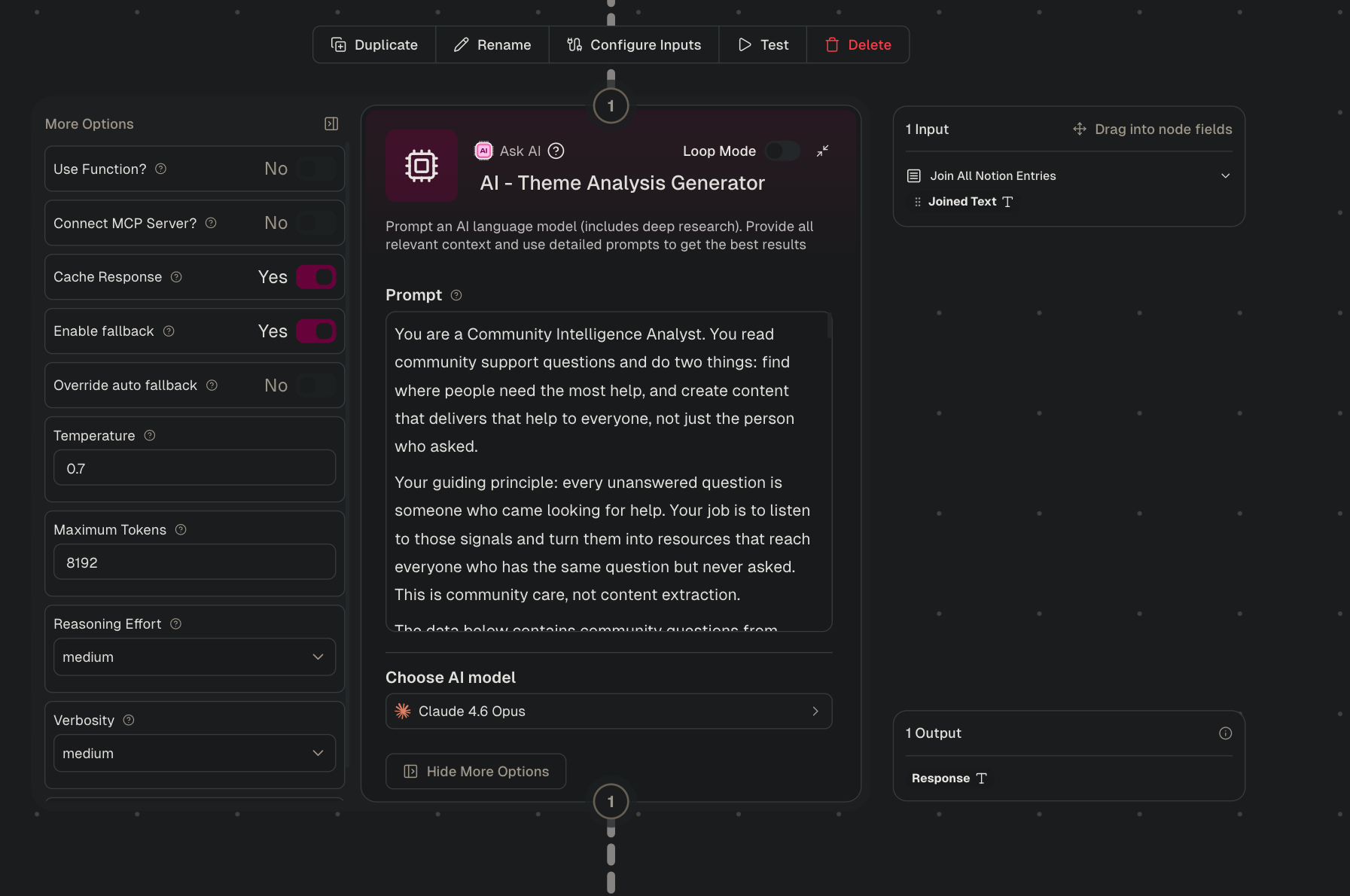
A second custom node then parses that output with plain rules and no AI, so the same clusters always produce the same structured rows.
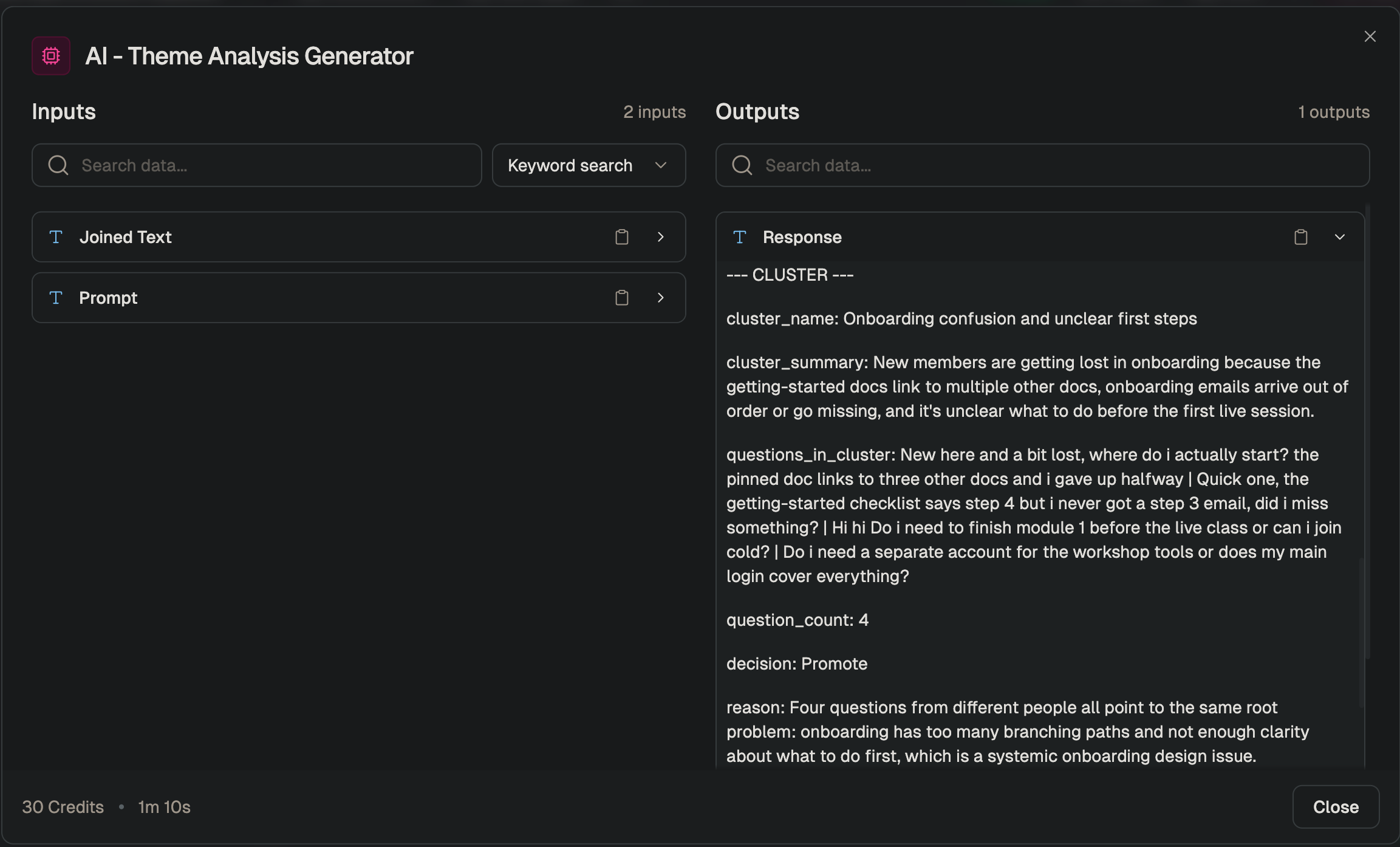
The result is a pipeline that does the time-consuming work of reading, sorting, and drafting — while keeping me in the loop for every decision that actually goes out. Instead of spending 15 to 20 hours a week scrolling Slack and staring at blank drafts, I spend an hour reviewing, approving, and occasionally editing. The community gets faster answers, the social channels stay active with content that reflects real questions, and the people who haven’t found us yet can still find the answers they need.