
I’m trying to hit 5,000 Instagram followers by the end of Q2 2026, and Instagram DM automation is one of the biggest reasons I’m even remotely close to that goal.
If you’ve been on Instagram recently, you’ve almost certainly seen it in action. A creator posts a reel and says, “comment GUIDE and I’ll send it to your DMs.” You comment, and seconds later, the thing lands in your inbox. That’s DM automation, and it’s a big part of what has helped me build my following.
Some of my best-performing content has some form of DM automation attached to it. It’s brought in roughly half of my current list of 3,000 followers, takes almost no time to set up, and, done right, doesn’t feel like a bot. So in this article, I’ll show you how to set it up, why you might want to, and how to keep it human — all based on what’s worked for me.
What is Instagram DM automation?
Instagram DM automation uses Meta’s official API to send direct messages automatically. It’s triggered when someone comments on a post, replies to a story, or sends you a specific keyword. It lets creators and businesses deliver a link, a resource, or a reply in seconds, without having to answer every message by hand.
In practice, it runs on three triggers:
- A comment on your post or reel (the “comment GUIDE and I’ll DM you” setup)
- A reply to your story
- A keyword sent straight to your DMs
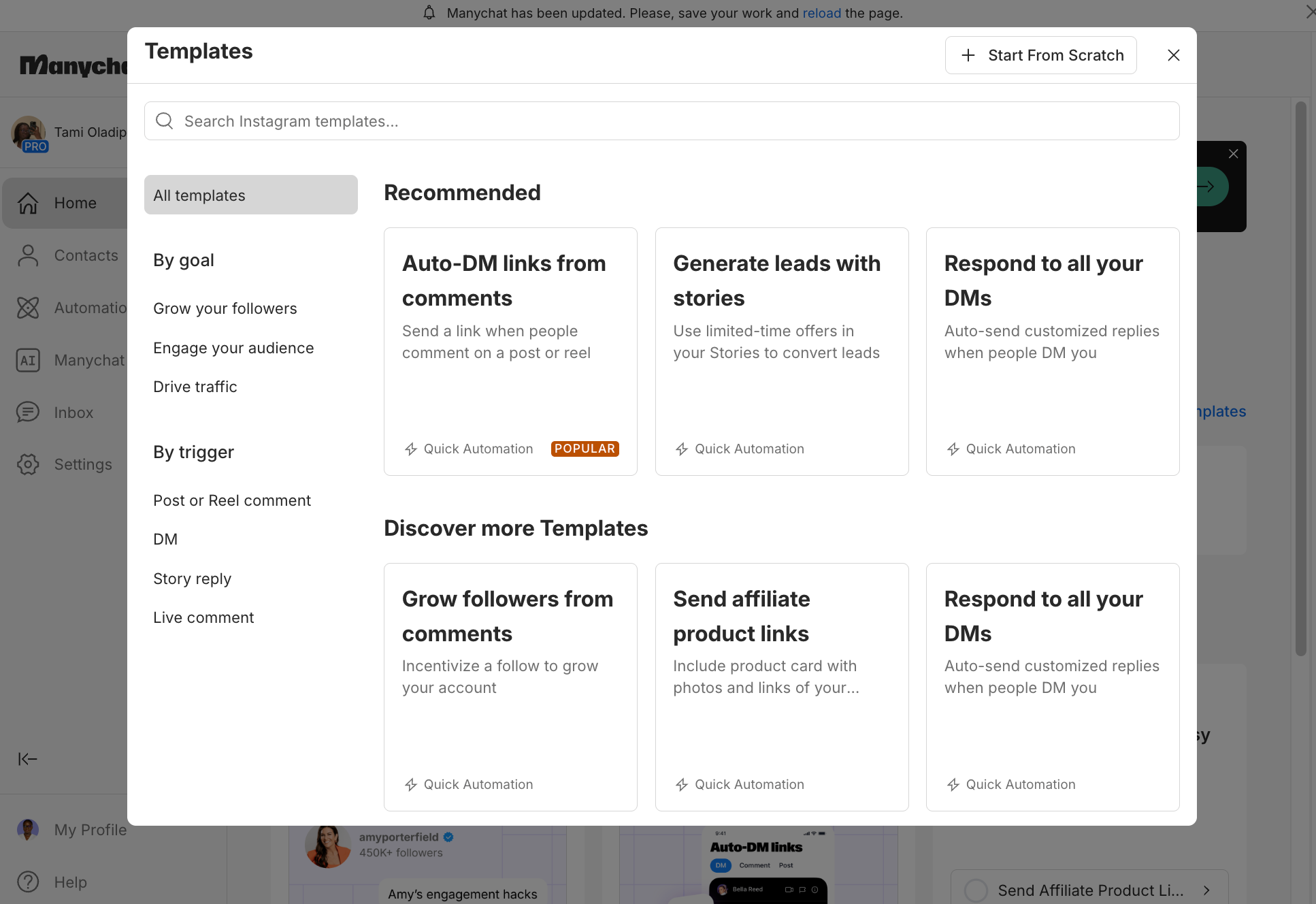
Now, here’s one thing worth clearing up early, because it trips people up. “Instagram automation” actually covers two very different worlds.
There’s message automation — the kind we’re discussing in this article — that sends DMs through Meta’s official API and is completely above board.
And then there are growth bots: the auto-like, auto-follow, fake-engagement tools that violate Instagram’s rules and can get your account restricted or banned.
This article is 100% about the first kind. If a tool promises you “guaranteed followers” or asks for your Instagram password, that’s the second kind, and not what we’re about.
⚡ Pro tip: The simplest litmus test for any tool: does it log you in through Meta’s official OAuth pop-up, or does it ask for your password directly? If it’s an official login, you’re safe. If it’s asking for your password, run.
How to set up Instagram DM automation
There are three ways to set this up, and the right one depends on your situation: whether you want the most powerful tool, the free platform-native option, or to lean on a subscription you already pay for. One thing they all need first: a business or creator account on Instagram, since DM automation runs through Meta’s professional features.
Use ManyChat if you want the most popular, purpose-built tool
If you want the most capable option, start with ManyChat. It’s what I use, it’s the one most creators reach for, and it’s an official Meta partner, which means it connects through Instagram’s API in a safe way.
Once your Instagram is connected, the setup follows the same six steps every time:
- Connect your account. Link your Instagram business or creator profile to ManyChat through Meta’s official login (remember, it’s always the OAuth pop-up, never a password).
- Pick your trigger. Start a new automation and choose what kicks it off. For the classic comment-to-DM, that’s Instagram comments.
- Set your keyword. Keep it short and obvious, like GUIDE or CV, so people actually type it correctly.
- Write the DM. A warm opener plus the resource or link they asked for. This is where your voice matters most: it should read like you wrote it.
- Add the following requirement (optional). Toggle it on and people follow you before they receive the resource. Whether you use it depends on your goal: pure reach or pure goodwill.
- Test, then scale. Send yourself the keyword to confirm it fires, then attach the same automation to as many posts, reels, or carousels as you want.
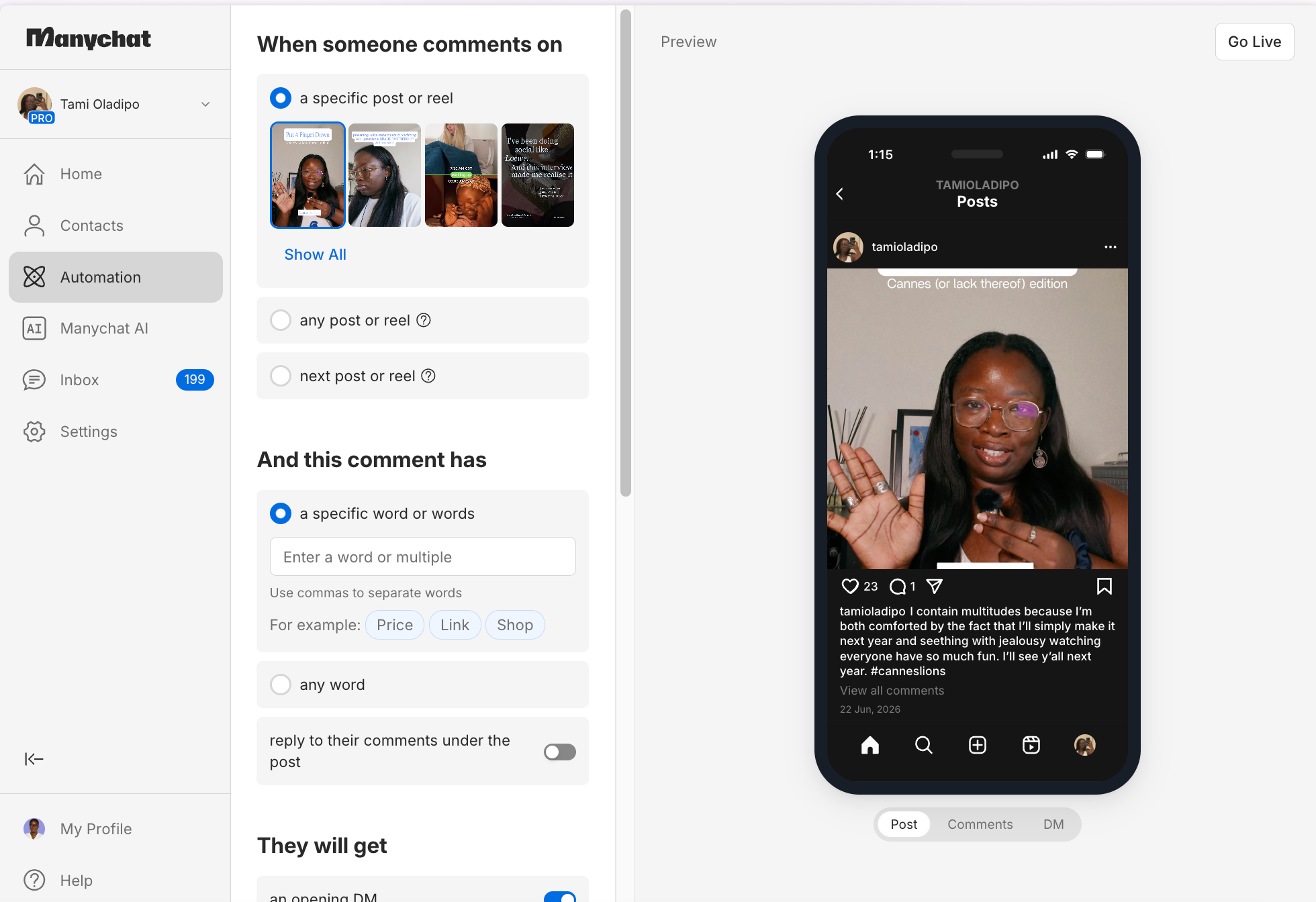
⚡ Pro tip: Always test the keyword before you go live. A broken automation in front of a post that’s taking off is so much worse than no automation at all.
ManyChat isn’t your only option. If the pricing or feel isn’t right for you, a few other tools connect through Instagram’s official API, too:
They cover similar ground, so the real differences come down to price, how the flow builder feels, and whether they lean more creator- or business-focused. ManyChat is still the first recommendation for most creators, but it’s worth exploring the field.
Use Meta Business Suite if you want to stay platform-native
If you’d rather not add another subscription or login, start here: Instagram has DM automation built in, for free. It lives inside Meta Business Suite, under Inbox → Automations, and it covers the essentials — instant replies, away messages, frequently asked questions, and comment-to-DM.
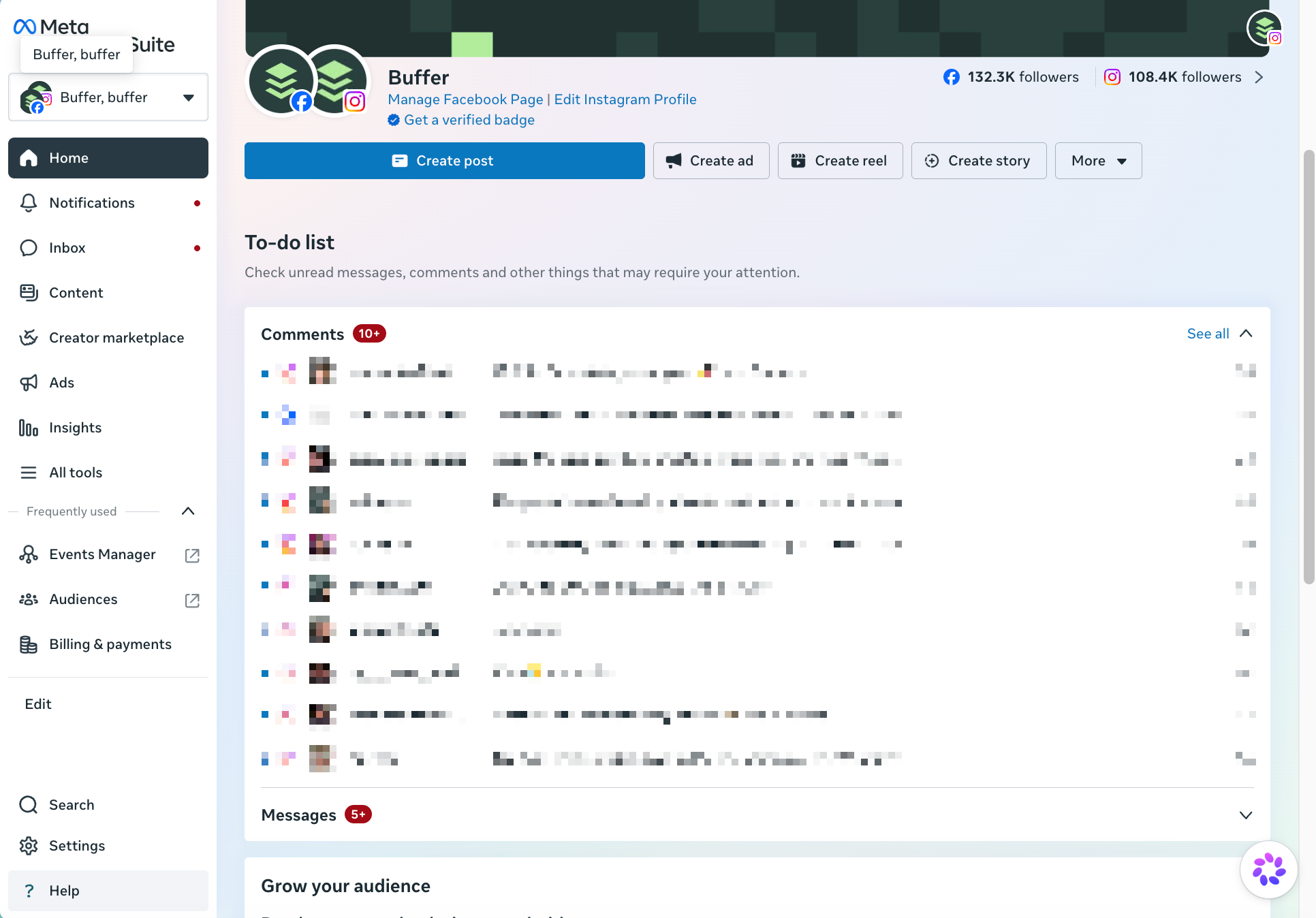
Setting up a comment-to-DM is quick:
- Open the automations. In Meta Business Suite, go to Inbox → Automations and choose the comment-to-DM option.
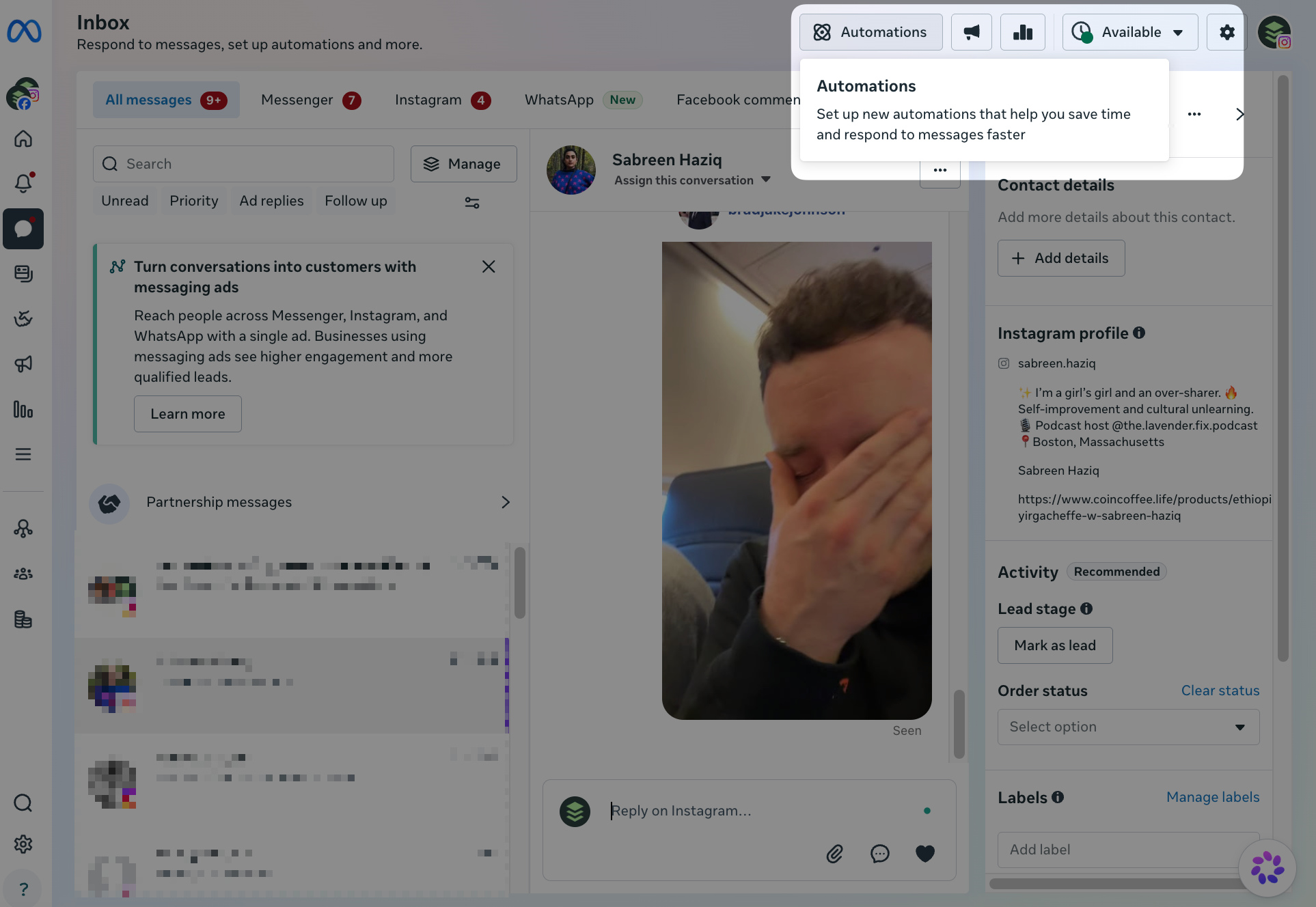
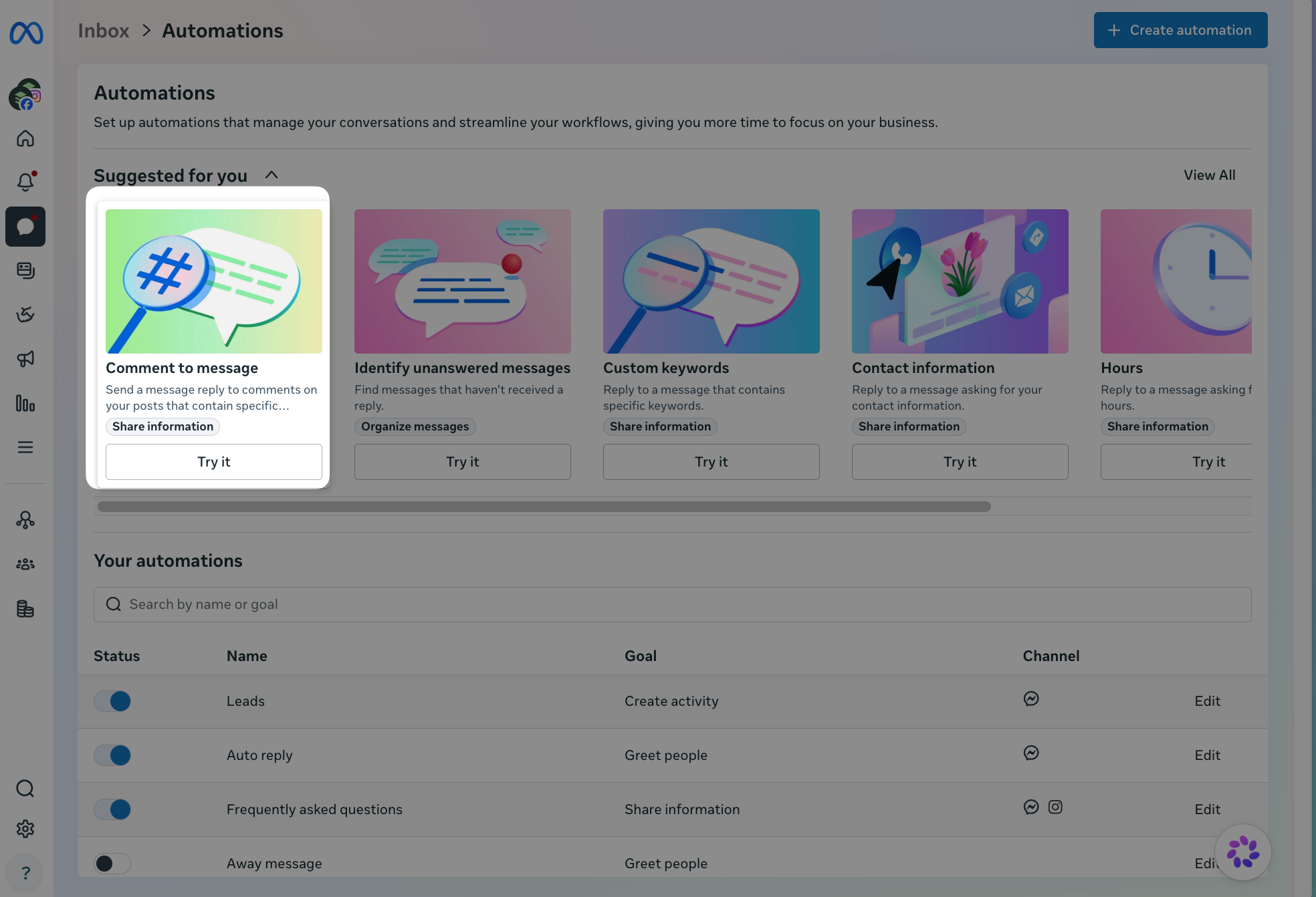
- Choose your post and keyword. Pick which post it applies to and the word people need to comment.
- Write the auto-reply. Add the message and link that lands in their DMs.
Meta Business Suite is the right starting point if you want to test DM automation before committing to a paid tool — it’s free, it’s official, and it gets the job done for straightforward comment-to-DM setups.
Is Instagram DM automation allowed?
Yes — when it’s done through Meta’s official API, Instagram DM automation is fully permitted. The tools covered in this article (ManyChat, Chatfuel, Inro, Spur, Meta Business Suite, and Buffer) all operate through that official channel. What Instagram prohibits are third-party bots that scrape data, fake engagement, or log in using your credentials directly. As long as you’re connecting via Meta’s OAuth login, you’re operating within the rules.
How to keep it from feeling robotic
The automation itself is fine. What makes or breaks the experience for your audience is how the message reads. A few things that help:
- Write in your actual voice. Read the DM out loud. If it doesn’t sound like something you’d say, rewrite it.
- Keep it short. One or two sentences of context, then the link. People asked for the resource, not an essay.
- Skip the corporate opener. “Hello! Thank you for your interest in our content!” is the fastest way to remind someone they’re talking to a bot.
- Use the keyword naturally. If someone commented GUIDE, open with something like “Here’s the guide you asked for!” — it acknowledges the exchange without being weird about it.
Start with one post
The best way to get started is to pick one post or reel you’re planning to publish, attach a single DM automation to it, and see how it performs. You don’t need to overhaul your whole content strategy. One comment trigger on one piece of content is enough to understand whether this works for your audience — and for most creators, it does.
Once you see it in action, adding it to future posts takes minutes. That’s the real value: the setup cost is low, but the compounding effect on reach and follower growth is significant over time.