For a long time, my ideas were scattered everywhere. Some were in my Notes app. Others were screenshots on my phone that I’d never opened again, or buried in old Claude conversations. Sometimes I’d remember a good line from a voice note I recorded months ago, but have no idea where to find it.
Everything was saved somewhere, just never anywhere I’d look when it was time to make something.
And even with this mega-level disorganization, I had been getting by fine. I have an 80-week creation streak in my personal Buffer account, and that’s not counting the content I make for Buffer’s channels. Coming up with ideas has never been my problem. Finding them again is.
So when MCPs started gaining traction, I went all in (though not in the way most tutorials suggested).
An MCP (Model Context Protocol) lets an LLM connect directly to the tools you already use, no code required. Most guides stop at what each individual connection can do, which is plenty useful. What changed how I work is using MCPs to pull all my scattered ideas into one place, then create and publish from that same place with tools that also run on MCPs, like Buffer, Canva, and Descript.
These are the 8 MCP servers I use every week to turn random ideas into finished posts without switching between a dozen tabs. Here’s the stack and how each one feeds into the next.
The Short Version
Buffer is the best MCP server for social media if you post to more than one platform. It’s a multi-platform MCP built for people who don’t write code, it’s free to connect, and it covers both ends of my system: a place for capturing ideas and a place for scheduling finished posts.
It’s in the top spot for a simple reason: every other tool in my stack exists either to get content into Buffer or to make the content that ends up there. Notion is home base for storing research, Granola pulls quotes out of my recorded calls, Google Workspace handles the admin, Elicit backs up my takes with research, Sublime holds everything I’ve saved from around the web, and Canva and Descript help turn an idea into something I can post.
Key Takeaways
- Buffer is the best multi-platform MCP server for social media. It’s built in partnership with social platforms, is free to connect, and works as both the place I capture ideas and the place I schedule posts. It connects to Claude, ChatGPT, Perplexity, and other MCP-compatible assistants.
- MCPs are the no-code version of APIs. You connect a tool once through OAuth, then ask Claude to do things in plain English.
- Every MCP in this stack is official and OAuth-based. You authorize access through your normal login and can revoke it anytime, which matters when you’re connecting tools to your social accounts.
- The stack splits in two: capture and create. Notion, Sublime, Granola, Google Workspace, and Elicit gather and organize the ideas; Canva, Descript, and Buffer turn them into finished posts.
| Tool | Job in the stack | Best for | Cost to connect |
|---|---|---|---|
| Buffer | Capture ideas + schedule posts | Multi-platform posting | Free |
| Notion | Deep storage for notes and resources | Creators and brands who use Notion for their content | Free |
| Sublime | Library of saved quotes, articles, and posts | Creators who save everything | Free |
| Granola | Turns call transcripts into ideas | People who could create posts based on their calls | Paid Granola plan |
| Google Workspace | Email, calendar, admin | Inbox-drowning creators | Free |
| Elicit | Backs up takes with research | Claim-making content | Paid Elicit plan |
| Canva | Copy → designed carousel | Canva-based designers | Free |
| Descript | Rough cuts, clips, captions | Long-form → short-form video | Descript plan with API access |
⚡ Note: You will need at least a paid plan for your AI assistant of choice to use many of these tools.
How I Think About My MCP Stack
Before we get to the list, here’s how the tools fit together, because that matters as much as what each one does.
One Hub with Two Jobs
The hub is the AI assistant you already use (for me, that’s Claude), and the two tasks are to capture and create.
A capture task is anything that gets an idea into your system: a note, a voice memo, a line from a call, a post you saved.
A create task is anything that turns that idea into something you can publish: a caption, a graphic, a cleaned-up video. Almost every MCP in my stack does one of those two jobs, while a couple of them do both.
Think in Hand-offs, Not Single Tools
Most people connect one tool and use it on its own, which is a good place to start. But I’ve seen the most benefit from the hand-offs.
An idea gets captured in one place, organized in another, and made into a post in a third, without you leaving the conversation to move it along. A quote that Granola caught on a call last month became a scheduled LinkedIn post in Buffer without me opening either app.
And there are even deeper levels to MCP usage, with my setup being a pretty simple one in the grand scheme of things.
Stick to Official MCPs That Use OAuth
When I’m deciding what to connect, I check for two things.
The first is official over individual. Anyone can build an MCP server, and many useful ones come from independent developers. But if something is going to have so much access to my data, I want it to be something that a company with strict security standards is accountable for.
The second is how you connect. The best MCPs run on OAuth, so you authorize them through your normal login (the same way you’d connect one app to another, like Instagram to Buffer), and you can revoke that access whenever you want.
Buffer
Best for: Anyone posting to more than one platform who wants one place to capture ideas and schedule the finished posts.
I have my Buffer connected to Claude, which gives it direct access to my connected channels, my posting queue, and of course, my ideas board. The MCP is powered by Buffer’s API, and once you connect it, you can manage your whole queue by asking Claude in plain language.
Scheduling is the obvious use case, but for me, it’s a capture layer for my ideas.
I’ll be reading something on my phone, or halfway through a Claude conversation that’s turned into a half-formed post idea, and instead of stopping to open Buffer and log it, I just say “save this as a Buffer idea.” It lands on my ideas board, tagged for the right platform, ready to be developed later. By the time I sit down to batch my content for the week, the board is already full of starting points I’d otherwise have lost.
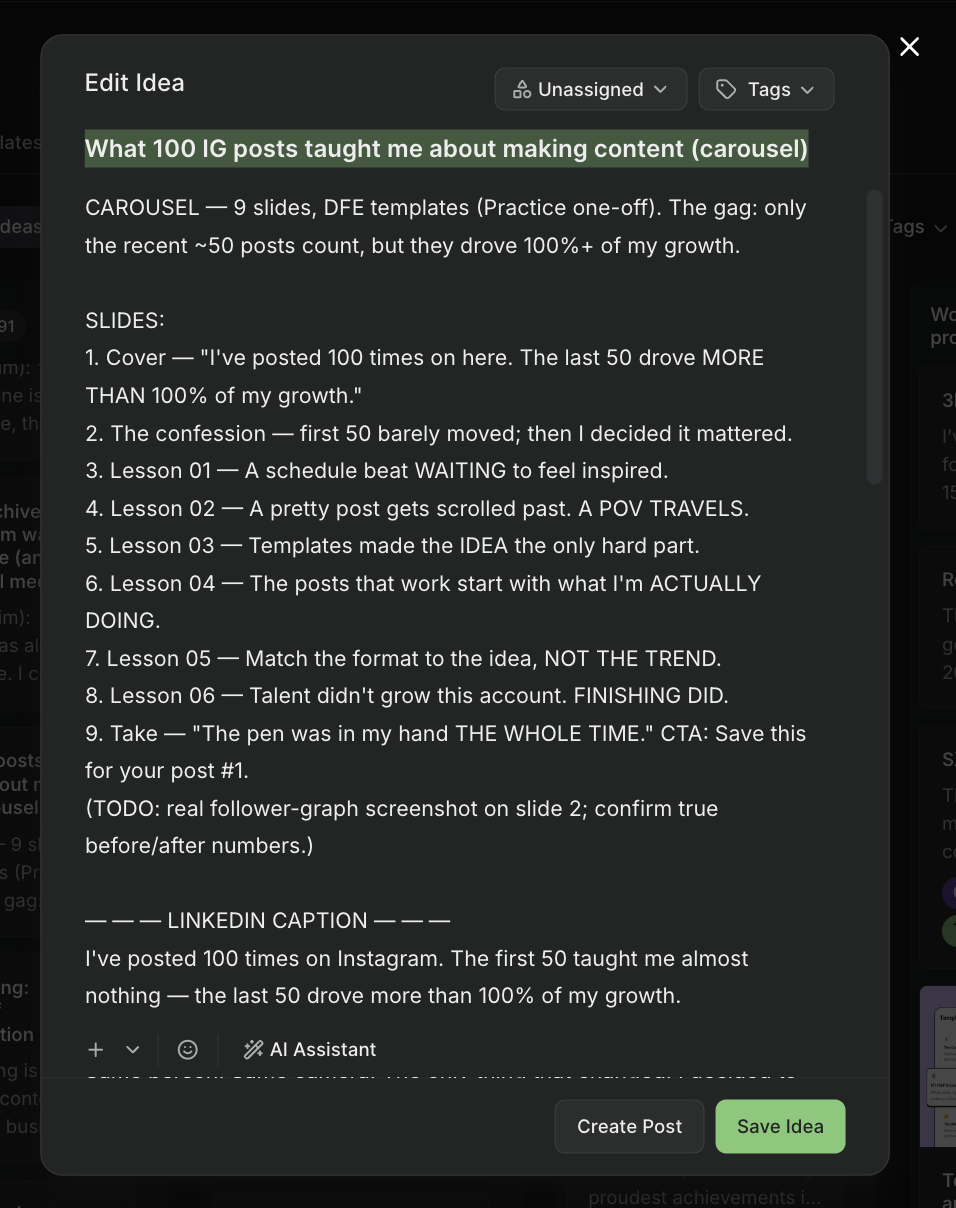
However, you can’t pull analytics through the MCP yet, so anything that depends on performance data still happens in the Buffer dashboard. For me, the MCP is a new front door to the queue, not a full replacement for it.
💡 Here’s how to connect the Buffer MCP
Notion
Best for: Anyone who already stores their notes, ideas, or resources in Notion and wants to put them to use.
The Notion MCP gives Claude access to years of my notes and ideas, all saved as Notion pages. That includes every resource I’ve ever built to share with my audience, like my database of 100+ remote work resources.
That database is my best example of why this connection matters. I built it to be shared, but a resource only helps people if they keep hearing about it. With the MCP connected, I can ask Claude to help me find new ways to point people to it: text posts, short videos, carousels.
Most recently, I asked for a hook for an Instagram trial reel (b-roll with on-screen text) plus a caption that sends people to the database through DM automation. In my capture-and-create split, this is Notion’s job: it’s the deep storage the rest of the stack pulls from.
It’s not just audience-facing content, either. I keep a page to track my brand partnerships, and when a campaign wraps, I can spin up a post-partnership analytics doc and quickly share it with the brand, all from the same conversation.
Even with all that, I believe I’m still underusing this one. The obvious next step is to have Claude help me build new resources from the notes already sitting in there, not just promote the ones that exist.
💡 Here’s how to connect the Notion MCP
Granola
Best for: Anyone who spends a lot of time on calls and suspects that half of what they say and hear could be content.
Granola records and transcribes my calls, and the MCP gives Claude access to all of those transcripts.
I started out using it for team calls, mostly to build internal communication and a reference library out of meeting notes. But lately I’ve been joining more calls with communities I’m part of and doing more interviews for podcasts and blog content, and those conversations are always valuable. I kept surprising myself with what I said, and realizing that a lot of what I was saying (and hearing) could be turned into content. But none of it was being captured.
Now I have Claude go through my Granola transcripts and pull content ideas. That’s usually enough of a starting point for me to develop a post, and it usually becomes a carousel. These are ideas I never would have thought to write down before, and a one-hour conversation can yield weeks of content ideas.
The same logic applies if you’re joining a lot of Zoom calls or listening to podcasts and video essays — conversations you’re already having are one of the most underused sources of content most creators have.