Enterprise sales prospecting requires a different approach than traditional prospecting. Buying committees span multiple departments, and a single missed stakeholder can stall a deal that looked ready to close.
The frameworks that work at the small and medium-sized business (SMB) level don’t hold up under that level of complexity. Enterprise sales teams need to build structures for sales cycles that stretch across quarters. They also need software to see where prospects are in the buying journey.
This guide covers the full enterprise prospecting process, including tips for how to prioritize target accounts, manage large buying groups, and avoid the mistakes that waste time without return.
What Is Enterprise Sales Prospecting?
Enterprise sales prospecting is the process of identifying and engaging decision-makers at large organizations to close deals. Enterprise sales teams typically look for potential buyers at organizations that employ 1,000 or more people. When engaging these buyers, sales reps must get buy-in from multiple stakeholders and navigate complicated procurement processes.
Sales teams use frameworks like MEDDPICC to qualify accounts early. From there, they tap tools like LinkedIn Sales Navigator and ZoomInfo to identify buying committee members. Reps pitch products and host demos to show all decision-makers the value of their offering.
Every touchpoint gets logged in a CRM platform, so reps can see each decision-maker’s stage in the buying journey.
For a deeper look at how enterprise deals are structured, see HubSpot’s guide to enterprise sales.
How Is Enterprise Prospecting Different from SMB Prospecting?
Enterprise prospecting targets organizations with complex buying committees, formal procurement processes, and multi-quarter sales cycles. SMB prospecting relies on high-volume outreach and short follow-up sequences aimed at a single decision-maker.
Enterprise prospecting focuses on outcome-based metrics instead of activity-based ones. According to HubSpot’s 2025 State of Sales Report, fewer than 5% of sales professionals prioritize pipeline coverage or lead scoring — a signal that volume-focused motions are losing ground to high-value, targeted account strategies.
Unlike SMB sales, enterprise B2B prospecting shifts to fewer prospects, deeper research, and significantly higher average contract values.
How to Select and Tier Enterprise Accounts for Outreach
Choosing the right accounts to pursue is one of the most important decisions in enterprise sales. A poorly built target list means reps spend months chasing deals that were never realistic. A focused list of accounts ranked by revenue potential, organizational fit, and readiness to buy produces a more qualified pipeline with less wasted outreach.
1. Define Your Ideal Customer Profile (ICP) Before Building Your Target Account List
An ideal customer profile (ICP) is a detailed description of the type of company most likely to buy and retain a product or service. Built from closed-won data, an ICP analyzes existing customers to identify shared characteristics, like:
- Industry
- Company size
- Revenue range
- Tech stack
- Team structure
- Geography
In enterprise sales, the ICP narrows prospecting to organizations where similar deals have closed, expanded, and renewed.
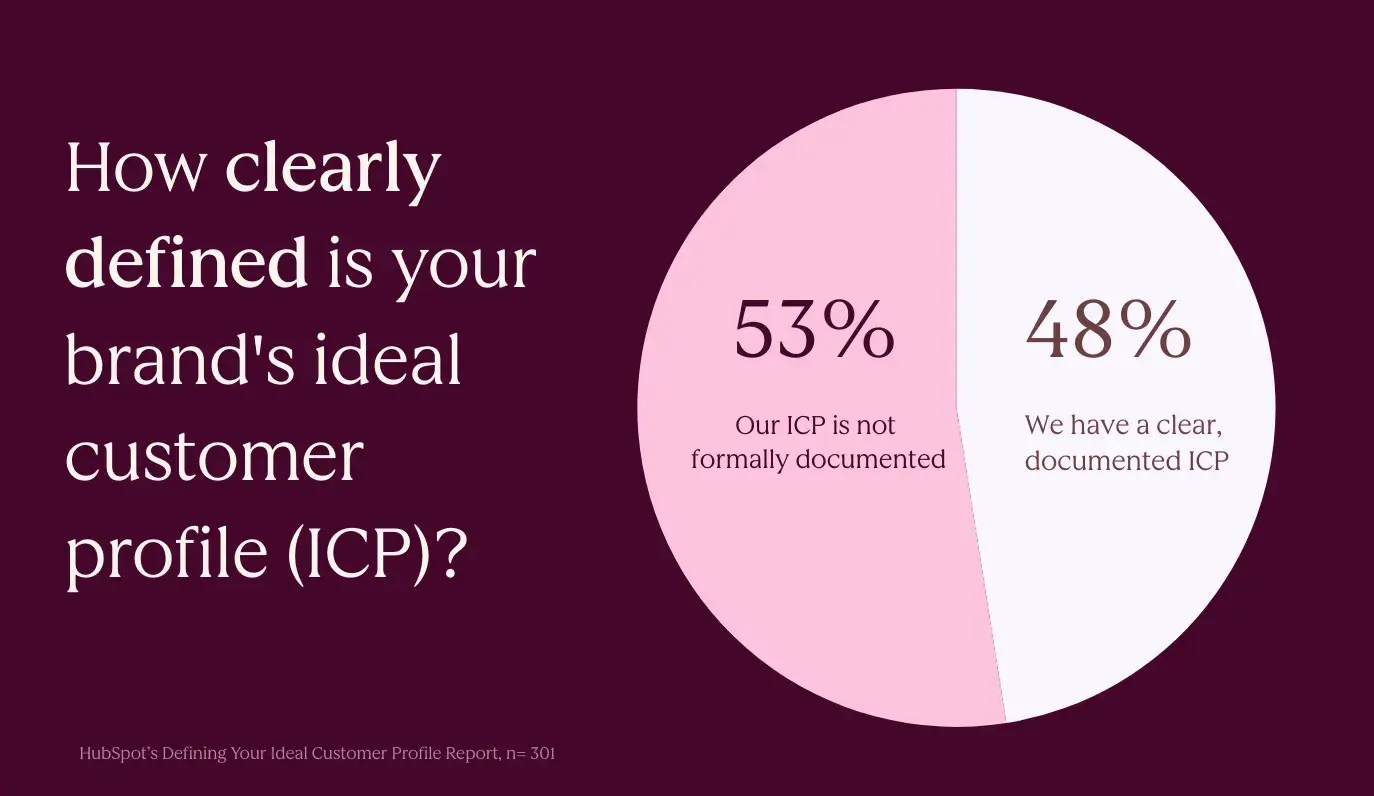
According to a HubSpot survey of over 300 marketers, only 48% have a clearly documented ICP, meaning roughly half of teams are running outreach without one. Choosing target accounts without a defined ICP produces a long list of maybes. When teams know who benefits most from an offering, reps can start outreach to accounts that already meet the baseline criteria for a winnable deal.
Kyle Denhoff, senior director of marketing at HubSpot, recommends taking that raw input further by feeding customer call transcripts into an AI tool.
He says, “I would take the AI transcripts. I would feed those conversations from those five customer calls into ChatGPT or Claude and say, ‘Define an ICP for me. Here’s what we know demographically about these customers. Here’s what we learned qualitatively. Turn it into something for me.‘“
2. Use Firmographic Filters to Narrow Your List of Potential Accounts
Firmographic filters are the baseline criteria used to determine whether a company belongs on a target account list at all. They function as a first-pass qualifier and remove accounts that fall outside the parameters. Filters keep deals realistically winnable before any outreach time is spent.
Core firmographic filters for enterprise prospecting typically include:
- Industry or vertical — the sectors where the product has proven use cases and reference customers.
- Company size — measured by employee count or revenue range, typically 1,000+ employees for enterprise sales.
- Geography — regions where the business is licensed, staffed, or able to support implementation.
- Technology stack — existing tools that indicate integration compatibility.
- Seniority and job profile — the roles most likely to sit on the buying committee for this type of purchase.
Denhoff describes the approach: “Whether that’s in your CRM, whether that’s going out to LinkedIn and understanding target companies in your market — that’s the information you want to bring in. It’s actually more of that firmographic data where it’s like industry, location, seniority, job profile.”
CRM platforms store much of this data on existing customers, making them the natural starting point for building filter criteria. With that ICP set, teams can use prospecting tools like LinkedIn Sales Navigator or ZoomInfo to reach out to potential buyers.
3. Layer in Intent Data and Buying Signals to Prioritize Accounts Ready to Engage
Intent data identifies accounts that are actively researching relevant topics, visiting competitor pages, or engaging with content in the category. These signals tell reps who to contact first. Intent signals typically fall into two categories:
- First-party signals — occur when a prospect visits a pricing page, downloads a resource, or engages with an email sequence.
- Third-party signals — behavioral data aggregated across the web that indicates research activity in a specific category.
Common buying signals worth tracking include:
- Content engagement — when prospects interact with blog posts, comparison guides, or product pages.
- Competitor research — when accounts review alternatives on platforms like G2 or Capterra.
- Job postings — when companies are hiring for roles that indicate a relevant initiative is underway.
- LinkedIn activity — when decision-makers engage with content in the category or follow competitor pages.
Once reps have reached out, prospects have filled out a form, or potential buyers have taken action on the site, those signals can be tracked in a CRM. With a full view of the customer, teams know when an account is worth prioritizing over others on the list.
4. Use Trigger Events to Time Outreach
Trigger events are external developments at a target account that signal a potential opening for a sales conversation. A new VP of Sales joining an organization, a funding announcement, an acquisition, or a public expansion into a new market all indicate change — and change creates buying opportunities.
Tools that aggregate and surface these signals reduce the manual effort required to monitor accounts. AI-powered prospecting agents, for example, can highlight relevant changes across target accounts, tying outreach to real-time context rather than static lists.
Using LinkedIn’s news and alerts feature to monitor target accounts is one practical approach. Watching for updates about funding rounds, leadership changes, and expansion announcements allows reps to time outreach to moments when a prospect is most likely to be evaluating new solutions.